Best Nintendo Switch Accessories for Every Setup
What's inside
- Top 3 Picks
- Quick Comparison
- How We Chose
- 1. PowerA Joy-Con Comfort Grips – Best for Handheld Comfort on Switch 1 and OLED
- 2. daydayup 3-Pack Tempered Glass Screen Protector – Best for Cheap, Replaceable Screen Defense
- 3. Nintendo Switch 2 Pro Controller – Best for Docked Play and Long Sessions
- 4. Lyyes Wireless Pro Controller, 2 Pack – Best for Local Multiplayer on a Budget
- 5. Nintendo Switch Sports – Best for Party Play and Motion Gaming
- 6. pdobq Portable Switch Dock – Best for Travel and Second TVs
- 7. Gammeefy Hall Effect Controller – Best for Drift Resistance and Grip
- 8. amFilm Auto-Alignment OneTouch Screen Protector – Best for Bubble-Free Switch 2 Installation
- 9. RTop 23-in-1 Switch Accessories Bundle – Best for New Owners Starting From Zero
- 10. Samsung microSD Express Card, 256GB – Best for Switch 2 Storage Expansion
- Top 3 Picks
- Quick Comparison
- How We Chose
- 1. PowerA Joy-Con Comfort Grips – Best for Handheld Comfort on Switch 1 and OLED
- 2. daydayup 3-Pack Tempered Glass Screen Protector – Best for Cheap, Replaceable Screen Defense
- 3. Nintendo Switch 2 Pro Controller – Best for Docked Play and Long Sessions
- 4. Lyyes Wireless Pro Controller, 2 Pack – Best for Local Multiplayer on a Budget
- 5. Nintendo Switch Sports – Best for Party Play and Motion Gaming
- 6. pdobq Portable Switch Dock – Best for Travel and Second TVs
- 7. Gammeefy Hall Effect Controller – Best for Drift Resistance and Grip
- 8. amFilm Auto-Alignment OneTouch Screen Protector – Best for Bubble-Free Switch 2 Installation
- 9. RTop 23-in-1 Switch Accessories Bundle – Best for New Owners Starting From Zero
- 10. Samsung microSD Express Card, 256GB – Best for Switch 2 Storage Expansion
As an Amazon Associate I earn from qualifying purchases. This post may contain affiliate links at no extra cost to you.
If you want the short answer: the Nintendo Switch 2 Pro Controller is the best overall Nintendo Switch accessory for anyone who plays docked most of the time, and the PowerA Joy-Con Comfort Grips are the best cheap upgrade if you play handheld. Those two cover the two halves of the hobby — big-screen sessions with full-size sticks, and portable play where cramped Joy-Con ergonomics are the real bottleneck. Everything else on this list exists to protect what you already own or to fix one specific annoyance: glass for the screen, a compact dock for a second TV, a high-speed card for Switch 2 storage, and a charging station so four controllers are never dead at once.
One thing to settle before you buy anything: Switch 2 (2025) is a physically different console from the original Switch and the OLED model. It has a larger screen, Joy-Con 2 attach magnetically instead of sliding onto rails, its dock outputs 4K/60 over HDMI, and it requires microSD Express cards for expanded storage. Cases, screen protectors, grips and docks are therefore not interchangeable between generations, and every pick below is flagged for the console it actually fits.
Our Top Picks


Top 3 Picks
Best overall: Nintendo Switch 2 Pro Controller
It solves the biggest problem with docked play — Joy-Con are small, and a full-size pad with full-size sticks, a real d-pad and a headphone jack makes long sessions genuinely more comfortable. It also adds Switch 2-specific features like the C button for GameChat and assignable GL/GR back buttons that no third-party pad on this list replicates.
Best budget: PowerA Joy-Con Comfort Grips
For the price of a couple of coffees, these turn two loose Joy-Con into something shaped like an actual controller, which fixes hand cramping on handheld sessions far more effectively than any software setting. There is no battery, no pairing, and nothing to configure — it is a mechanical fix that either fits your console or does not.
Best for handheld-first setups: daydayup 3-Pack Tempered Glass Screen Protector
If your console lives in a bag, the screen is the part most likely to get scratched, and a three-pack of tempered glass costs less than one replacement screen assembly. Buying three at once also means you stop treating the first chip or crack as a crisis — you just swap the panel and move on.
Quick Comparison
Price tiers below are relative bands, not fixed prices — accessory pricing moves constantly, especially around console launches and holiday sales. Use the tier to judge value against the rest of the list, then check current listings for the actual number.
| Product | Best for | Key specs | Price tier |
|---|---|---|---|
| PowerA Joy-Con Comfort Grips | Handheld comfort on Switch 1 / OLED | Two-piece molded grip shell for one Joy-Con pair; matte hard plastic with rubberized contact points; no electronics, no battery | Budget |
| daydayup 3-Pack Tempered Glass Screen Protector | Cheap, replaceable screen defense | 3 tempered glass panels; ~0.3 mm thickness class; 9H-class hardness claim; oleophobic coating; dry-install kit | Budget |
| Nintendo Switch 2 Pro Controller | Docked play and long sessions | Full-size sticks and d-pad; assignable GL/GR back buttons; 3.5 mm headphone jack; C button for GameChat; HD rumble; built-in amiibo reader; USB-C charging | Premium |
| Lyyes Wireless Pro Controller, 2 Pack | Local multiplayer on a budget | Two wireless pads; USB-C charging; motion and vibration features typical for the class; no NFC/amiibo; no HD rumble | Mid-range |
| Nintendo Switch Sports | Party play and motion gaming | Physical game card; bowling, tennis, badminton, volleyball, chambara, soccer and golf; requires motion-capable controllers; physical release bundles a leg strap | Premium |
| pdobq Portable Switch Dock | Travel and second TVs | Compact HDMI adapter dock; USB-C input; 4K/60Hz output claim; HDMI plus USB ports; power supply not always included | Mid-range |
| Gammeefy Hall Effect Controller | Drift resistance and grip | Hall-effect analog sticks (magnetic sensing, no contact wear); enhanced grip shell; wireless; themed shell options | Mid-range |
| amFilm Auto-Alignment OneTouch (Switch 2) | Bubble-free Switch 2 glass | Alignment-tray applicator; tempered glass; multi-pack; cut specifically for the Switch 2 display | Budget |
| RTop 23-in-1 Accessories Bundle | New owners starting from zero | 23 pieces: carrying case, glass, grips, thumb caps, cables, game card storage and more | Premium |
| Samsung microSD Express Card, 256GB | Switch 2 storage expansion | microSD Express interface; 256GB capacity; read speeds in the SD Express class, many times faster than UHS-I microSD | Premium |
| Kytok Switch Organizer Station | Charging and tidy storage | Charging rails for multiple Joy-Con pairs; game card slots; accessory tray; built around Switch 1 / OLED Joy-Con rails | Mid-range |
| SATURNDOCK 45W AC Adapter | Travel charging | 45W USB-C Power Delivery; 5 ft detachable USB-C cable; wall plug; listed as compatible with Switch, Lite, OLED and Switch 2 | Budget |
How We Chose
Nothing here is based on laboratory measurement or long-term ownership logs. Selection is research-based and rests on four things: the published specifications on each listing, whether the item solves a problem that a large number of Switch owners actually have, how well it fits a specific console generation, and whether it leaves a sensible upgrade path open rather than locking you into a dead end.
Specifications were checked for the details that decide a purchase rather than the ones that pad a marketing bullet list: physical dimensions and fit, material and construction, power requirements, interface type (USB-C Power Delivery, HDMI, microSD Express), and the compatibility line that tells you whether an accessory works with the original Switch, the OLED model, the Lite, the Switch 2, or only some of them. Where a listing made a claim we could not verify from the spec sheet, we described the item by its specification class instead of repeating a number.
Category fit mattered as much as raw specs. A screen protector and a pro controller are not competing for the same slot in your bag, so each product was judged against the job it is actually meant to do. Finally, we weighted upgrade path: a budget accessory that becomes useless the moment you move to a newer console scores lower than one that keeps working or can be handed down.
1. PowerA Joy-Con Comfort Grips – Best for Handheld Comfort on Switch 1 and OLED
As an Amazon Associate we earn from qualifying purchases at no extra cost to you.

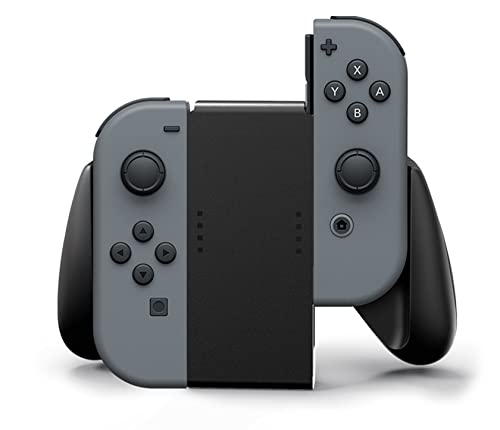
These grips exist because of a simple ergonomic truth: two Joy-Con held in your hands with nothing between them are small, flat, and shaped for a child’s hands rather than an adult’s. The PowerA Comfort Grips are a two-piece molded shell that each Joy-Con slides into, joining them into a single controller-shaped block. If you play in handheld mode for more than about twenty minutes at a stretch, this is the cheapest meaningful improvement you can make to a Switch 1 or OLED setup.
Key specs
- Type: mechanical grip shell for one pair of Joy-Con, sold in black
- Fit: designed for Switch 1 and OLED Joy-Con rails — not compatible with Switch 2’s magnetic Joy-Con 2
- Material: hard matte plastic with rubberized contact points where your palms rest
- Electronics: none — no battery, no pairing, no rumble pass-through, nothing to charge
- Charging: Joy-Con charge on the console rails or in a separate charging dock; the grip is not a charging accessory
What it does well
The palm swell is the whole point. Adding roughly the depth of a full-size controller grip behind the Joy-Con changes the angle your thumbs sit at, which reduces the strain that comes from holding your hands in a pinched position for an hour. The matte finish helps in long sessions where glossy plastic would get slippery, and because the shell is rigid rather than a silicone sleeve, it does not shift or bunch up while you play.
The second advantage is that it costs almost nothing relative to any other accessory here, and it introduces zero failure points. There is no battery to age, no firmware to update, no wireless pairing to drop mid-match. If it fits your Joy-Con, it works forever, and if you later buy a full-size pad for docked play, the grips stay useful for handheld sessions rather than becoming redundant.
Pros
- Transforms Joy-Con ergonomics for a fraction of the cost of a pro controller
- No battery, no firmware, no pairing — nothing that can fail or need updating
- Rigid shell does not slip or bunch the way soft silicone grips can
- Adds almost no weight and still fits in most carry cases
- Keeps both Joy-Con together as one unit, which suits one-piece handheld play
Cons
- Does not fit Switch 2 Joy-Con 2, so it is a dead end if you upgrade consoles
- You must remove the Joy-Con to charge them on the console rails
- No rumble, motion, or button changes — it is purely a shape fix
- Does not add a d-pad, a headphone jack, or any input the Joy-Con lack
How it compares
The nearest alternative in this list is the Gammeefy Hall Effect Controller, which also targets handheld comfort but replaces the input hardware entirely and adds drift-resistant sticks — at several times the cost and with a battery that will eventually age. The RTop 23-in-1 bundle includes a grip of its own as part of a larger kit, so if you need a case, glass and cables anyway, the bundle can absorb this purchase. If comfort is your only complaint, though, buy the grips alone and put the rest of the money toward a card or a controller later.
2. daydayup 3-Pack Tempered Glass Screen Protector – Best for Cheap, Replaceable Screen Defense
![daydayup [3 Pack] Tempered Glass Screen Protector Compatible with Nintendo switch - Transparent HD Clear Anti-Scratch Screen Protector Skin Set for Nintendo Switch](https://m.media-amazon.com/images/I/51xpB0YDutL._SL160_.jpg)
A Switch screen that never leaves its dock barely needs protection. A Switch that rides in a backpack next to keys, a charging brick and a water bottle absolutely does. The daydayup three-pack is the pragmatic answer: tempered glass panels in a multi-pack priced low enough that you stop worrying about the first scratch. It is aimed at Switch 1 and OLED owners who want coverage without spending premium-tier money on a single sheet of glass.
Key specs
- Type: tempered glass screen protector, transparent HD clear, three panels per pack
- Thickness class: roughly 0.3 mm — thin enough to keep touch sensitivity intact, thick enough to absorb a key scratch
- Hardness claim: 9H-class surface, the standard rating band for tempered glass protectors
- Coating: oleophobic layer to resist fingerprints and make wiping easier
- Installation: dry-apply with a cleaning cloth, dust-removal sticker and smoothing card
- Fit: cut for the original Switch / OLED display area — not shaped for the larger Switch 2 panel
What it does well
Glass beats film on two measurable fronts. First, it is harder, so it resists the everyday abrasion that dulls a plastic film within weeks. Second, when it does fail, it fails in a way you can see and replace — a crack or a chip in the glass sheet, while the display underneath stays intact. That sacrificial-layer logic is exactly why a three-pack makes more sense than a single premium panel: your first application will almost certainly have a dust speck under it, and having spares removes the pressure to get it perfect.
The oleophobic coating is the underrated part. Switch screens get touched constantly, and a coating that sheds oil means a quick sleeve wipe restores clarity instead of a smeary haze that makes bright games look soft. Expect the coating to fade with use — that is normal for the category and applies to every glass protector, not just this one.
Pros
- Three panels means a botched install or a later crack is not a disaster
- Tempered glass resists scratches far better than plastic film
- Thin profile keeps touch response and dock clearance essentially unchanged
- Oleophobic coating makes routine cleaning quick
- Low enough cost to treat as a consumable rather than an investment
Cons
- Not cut for Switch 2 — a different console needs a different protector
- Dry installs still attract dust; a steamy bathroom and patience help
- Glass edges can chip on impact even when the center survives
- Oleophobic coating wears off over months of heavy use
How it compares
The amFilm Auto-Alignment OneTouch is the direct rival and the better choice if you own a Switch 2, because its alignment tray removes most of the human error from installation. The trade-off is that you are paying a little more per panel for the applicator. If you already own a Switch 1 or OLED, the daydayup pack gives you more spares for the same money, and the alignment advantage matters less once you have done the job twice.
3. Nintendo Switch 2 Pro Controller – Best for Docked Play and Long Sessions

If your console spends most of its life in the dock, this is the accessory that changes how the whole system feels. Nintendo’s first-party Pro Controller for Switch 2 is a full-size pad with full-size analog sticks, a proper d-pad, and the build quality you would expect from the company that made the console. It suits players who put in long sessions — open-world games, racing, shooters, anything where precision matters more than portability — and who want the Switch 2-specific features to actually work rather than be approximated.
Key specs
- Layout: full-size analog sticks and d-pad in the standard Nintendo layout
- Back buttons: assignable GL/GR paddles for remapping inputs without leaving a game
- Audio: built-in 3.5 mm headphone jack, useful for TV play without waking the house
- System features: C button for Switch 2’s GameChat function
- Feedback: HD rumble, plus a built-in NFC reader for amiibo
- Charging: USB-C; Nintendo rates the internal battery for tens of hours of typical play
- Fit: built for Switch 2 first — verify compatibility notes before buying for an original Switch or OLED
What it does well
The ergonomics are the headline. Full-size sticks give you a longer throw and finer control than Joy-Con, which matters in any game with camera control or aiming, and a real d-pad makes 2D platformers and menu-heavy RPGs far less fiddly. The GL/GR back paddles are genuinely useful once you map them — jump and dash on the paddles keeps your thumbs on the sticks, which is the kind of small advantage you notice immediately in fast games and stop noticing entirely once it becomes habit.
The headphone jack is a bigger deal than it sounds. On a TV, audio normally goes to the television or a soundbar, which is a problem at night. Plugging headphones into the controller solves it without running a cable across the room. Add HD rumble, amiibo support and the C button, and this is the only pad on this list that speaks every Switch 2 system feature natively rather than through a compatibility layer.
Pros
- Best-in-class ergonomics for docked, long-session play
- Native support for Switch 2 features, including GameChat and HD rumble
- Assignable back paddles add real input options
- 3.5 mm headphone jack keeps late-night TV sessions quiet
- Built-in amiibo reader and USB-C charging, no dongles or adapters
Cons
- Premium tier — by far the most expensive single accessory here
- Designed around Switch 2; original Switch and OLED owners should confirm compatibility first
- It is a home pad, not a travel pad — it does not clip to the console
- Only one controller, so four-player nights need more hardware
How it compares
The Lyyes 2-pack costs less per controller and gives you two pads, which is the smarter buy if your priority is getting four people onto the sofa. What it cannot match is the first-party feature set: no amiibo, no HD rumble, no GameChat button, and a lighter build. The Gammeefy Hall Effect Controller sits between them, offering drift-resistant sticks at a mid-range price but without Nintendo’s system-level integration. Buy the Pro Controller if you play solo or two-player and want the best feel; buy the alternatives if you need headcount.
4. Lyyes Wireless Pro Controller, 2 Pack – Best for Local Multiplayer on a Budget

Four-player Mario Kart and Smash nights are where the accessory math gets ugly: first-party pads are premium tier each, and buying three of them costs more than a game bundle. The Lyyes wireless pro controller two-pack solves that specific problem. It is aimed at households where extra controllers matter more than premium materials, and at players who want a full-size grip shape for handheld-adjacent play without paying first-party prices.
Key specs
- Quantity: two wireless controllers per pack
- Compatibility listed: Switch, Switch Lite and Switch 2
- Shape: full-size pad with dual analog sticks and standard button layout
- Charging: USB-C
- Features typical of the class: adjustable vibration, motion support, and often a turbo or auto-fire function
- Not included: NFC/amiibo reading and HD rumble — these are first-party features
What it does well
The core value is straightforward: two full-size wireless pads for roughly what one premium controller costs. For party games, that is a completely different equation — instead of asking a guest to use a single Joy-Con sideways, everyone gets a real grip and a proper stick. In practice, third-party pads in this class handle the basics competently: pairing is a button-hold away, charging is a standard USB-C cable, and the analog sticks are accurate enough for kart racers and party fighters where absolute precision is not the deciding factor.
They also make a reasonable second set for travel. Leaving a mid-range pad in a bag is far less stressful than leaving a premium one there, and if a controller gets sat on or a stick starts to feel loose after a year of party duty, the replacement cost is low. Treat them as the controllers that live in the drawer and come out when people visit, and they earn their keep.
Pros
- Two controllers per pack, which is the cheapest route to four-player nights
- Full-size grip shape rather than tiny sideways Joy-Con
- USB-C charging matches the console’s cable, so no extra bricks
- Cheap enough to be treated as semi-disposable guest hardware
- Listed as compatible across Switch, Lite and Switch 2
Cons
- No amiibo reader, so those figures are unusable with these pads
- No HD rumble — vibration is basic by comparison
- Build materials and stick mechanisms are a step below first-party hardware
- Analog sticks in this class typically use contact-based sensing, which is what eventually drifts
- Motion support is present but generally less precise than Joy-Con
How it compares
Against the Nintendo Switch 2 Pro Controller, the Lyyes pair wins on headcount and loses on everything else: no headphone jack, no back paddles, no amiibo, no HD rumble. Against the Gammeefy Hall Effect Controller, the trade-off flips — Gammeefy gives you one pad with drift-resistant sticks and a grippier shell, while Lyyes gives you two pads with conventional sticks. If your problem is “we need more controllers tonight,” buy the pair. If your problem is “my sticks keep drifting,” buy the Hall-effect pad.
5. Nintendo Switch Sports – Best for Party Play and Motion Gaming

Not every accessory is hardware. Switch Sports is the software that justifies owning motion controllers in the first place, and it is the single best reason to keep a pair of Joy-Con charged and accessible rather than buried in a drawer. It suits families, casual groups and anyone who wants a game that a non-gamer can pick up in ninety seconds without a tutorial.
Key specs
- Format: physical game card for the Switch family
- Sports included: bowling, tennis, badminton, volleyball, chambara (sword fighting), soccer and golf
- Input: motion control via paired motion-capable controllers — this is not a button-only game
- Bundled extra: the physical release includes a leg strap for the soccer mode
- Players: supports both local multiplayer on one console and online play
What it does well
The genius of the format is that the controller becomes the instrument. Bowling works because the throw motion maps cleanly; tennis works because swing timing is readable; chambara works because two players can physically face off in the same room. Because the physical edition ships with the leg strap, soccer mode becomes a proper leg-driven game rather than a compromise, which is the kind of detail that turns a tech demo into something you actually play on a Friday night.
It also ages well as a social object. Single-player content is thin compared to a full RPG, but that is not the point — the value is in repeat sessions with the same group, where the skill curve is shallow enough that a first-timer can beat a regular. If you own a Switch primarily for solo, narrative-driven games, this is not for you. If you own one because other people come over, it is close to essential.
Pros
- Immediately understandable — no tutorial wall for new players
- Genuinely physical, which is what makes the motion controllers worth owning
- Physical edition includes the leg strap for soccer
- Strong local and online multiplayer support
- Broad age appeal, from children to grandparents
Cons
- Requires motion-capable controllers; a Pro Controller alone is not enough
- Thin solo content once the novelty settles
- Needs physical space — a small living room limits the swing-heavy sports
- Premium tier pricing for a game rather than hardware
How it compares
There is no direct hardware comparison here, but the practical one is: Switch Sports is the reason to keep two Joy-Con in working order, which in turn is the argument for the PowerA Comfort Grips and the Kytok charging station. If your Joy-Con are drifting, this game will expose it faster than anything else — big, sweeping motions make stick error obvious. Budget for a controller refresh if you plan to play it seriously.
6. pdobq Portable Switch Dock – Best for Travel and Second TVs

The official dock is a chunky plastic slab with a cable routing problem, and nobody wants to unplug it from the living room TV every time they travel. The pdobq portable dock is a compact HDMI adapter that turns any TV with an HDMI port into a Switch display. It suits frequent travellers, people with a second TV in a bedroom or office, and anyone who wants a permanent dock setup in two rooms without buying two official docks.
Key specs
- Type: portable docking station / TV adapter with a USB-C male connector
- Output: HDMI, with a listed 4K/60Hz capability
- Ports: HDMI out plus USB ports for accessories, and USB-C power input
- Form factor: pocket-sized, no cradle — the console sits beside it rather than inside it
- Power: a compatible USB-C Power Delivery supply is required and is not always included
What it does well
The size is the point. A dock that fits in a jacket pocket means the difference between taking the console on a trip and leaving it at home. Setup takes seconds: plug the adapter into the console, run an HDMI cable to the TV, and connect a Power Delivery brick to the adapter’s power input. Once running, it behaves like a dock — output to the TV, charging to the console, USB ports for wired controllers or a keyboard.
The 4K/60Hz claim is worth understanding rather than repeating. The original Switch and OLED output a maximum of 1080p, so 4K capability is irrelevant for those systems — it matters for Switch 2, whose dock is designed around 4K output on compatible displays. If you are buying this for an original Switch, you are buying it for portability, not resolution.
Pros
- Small enough to live permanently in a laptop bag
- Turns any HDMI-equipped TV into a Switch display in under a minute
- USB ports allow wired controllers and peripherals
- Cheaper than a second official dock for a bedroom or office setup
- 4K/60Hz output capability suits Switch 2 on a compatible TV
Cons
- Usually needs a separate Power Delivery charger, which adds to the real cost
- No cradle, so the console sits loose on a table — less tidy, easier to knock
- Third-party docks depend on correct power negotiation; a poor-quality supply is a real risk
- Cable management is entirely on you
How it compares
The obvious pairing is the SATURNDOCK 45W AC Adapter, which supplies the Power Delivery input this dock needs — buy them together and you have a complete travel setup. Compare that with the Kytok Organizer Station, which is the opposite philosophy: a fixed home base that charges controllers and stores games, but never travels. If you need one dock for two locations, go portable; if you need a tidy home hub, go stationary.
7. Gammeefy Hall Effect Controller – Best for Drift Resistance and Grip
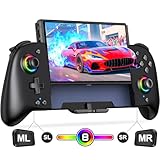
Stick drift is the defining long-term failure of the Switch generation, and it is a mechanical problem, not a software one. Conventional analog sticks use contact-based sensing — a wiper physically brushes a resistive track, and that contact surface wears with every hour of play. The Gammeefy controller replaces that mechanism with Hall-effect sensors, which read the stick position magnetically with no physical contact to wear down. It suits anyone who has already replaced a Joy-Con pair and does not want to do it again.
Key specs
- Sticks: Hall-effect analog sticks using magnetic sensing rather than contact wipers
- Shell: enhanced grip design with a textured, contoured body
- Positioning: a wireless Joy-Con replacement pad with themed shell options
- Connection: wireless, with USB-C charging
- Features typical of the class: adjustable vibration and motion support
- Not included: HD rumble and NFC/amiibo reading
What it does well
The Hall-effect sticks are the reason to buy it. Because there is no wiper dragging across a carbon track, the wear mechanism that produces drift in the first place is largely removed. The sticks can still develop play in the plastic socket over years of use, and the sensor can still be knocked out of calibration, but the specific failure that sends most Joy-Con to the bin is addressed at the design level rather than patched after the fact.
The enhanced grip is the second benefit. A textured, contoured shell is easier to hold during long sessions than smooth plastic, particularly if your hands get warm. Combine that with a mid-range price and you have a controller that undercuts first-party hardware while offering one clear technical advantage over it. If drift is the problem you are solving, the spec sheet here is more relevant than the badge on the front.
Pros
- Hall-effect sticks remove the main cause of analog stick drift
- Enhanced grip shell improves comfort over bare Joy-Con
- Mid-range price undercuts first-party controllers
- Themed shell options give some personality
- Wireless with USB-C charging, matching the console’s cable standard
Cons
- No HD rumble and no amiibo reader
- Third-party motion controls are generally less precise than Joy-Con
- Check whether the model is a one-piece pad or a split pair before buying
- Plastic stick sockets still wear over time, even if the sensors do not
- Firmware updates and support are less predictable than first-party
How it compares
Against the Nintendo Switch 2 Pro Controller, this pad trades system integration — GameChat button, headphone jack, back paddles, HD rumble — for a lower price and a stick mechanism that is arguably more durable. Against the Lyyes 2-pack, it is a quality-over-quantity choice: one drift-resistant pad instead of two conventional ones. If your Joy-Con have already drifted once, the Hall-effect option is the more sensible long-term spend.
8. amFilm Auto-Alignment OneTouch Screen Protector – Best for Bubble-Free Switch 2 Installation

Installing a screen protector is the most reliably botched job in console ownership. Dust settles the instant you peel the backing, and a single speck traps a bubble that no amount of smoothing will remove. The amFilm Auto-Alignment OneTouch system attacks that problem directly: the glass sits in a tray that aligns itself with the console, so you apply the panel with a single motion instead of eyeballing the edges. It is cut for the Switch 2’s larger display, which makes it one of the few protectors here that fits the newer console.
Key specs
- Type: tempered glass screen protector with an alignment-tray applicator
- Fit: cut specifically for the Nintendo Switch 2 display
- Installation: OneTouch tray system — drop the console in, pull, and the glass seats itself
- Surface: oleophobic coating for fingerprint resistance
- Pack size: multi-pack, so you have a spare if the first attempt picks up dust
What it does well
Alignment trays solve the two failure modes at once. The first is lateral misalignment — a protector applied half a millimetre off looks wrong forever, with an uneven border that catches light. The second is the dust sandwich: the tray lets you position everything before the adhesive touches glass, so there is a clean window to inspect and remove specks with a sticker before committing.
Because it is cut for Switch 2, the edges land where they should around the larger display and its bezel. That matters more than it sounds — a protector sized for an older console will either overhang the edge and lift, or fall short and leave a border of exposed glass exactly where your thumb rests. The oleophobic coating does the same job as on any glass panel: it makes the screen easier to wipe clean during long sessions.
Pros
- Alignment tray removes most of the risk of a crooked install
- Cut specifically for Switch 2, so the edges fit the bezel properly
- Tempered glass resists scratches far better than film
- Multi-pack gives you a spare for a first-attempt failure
- Oleophobic coating keeps fingerprints manageable
Cons
- Costs more per panel than a plain multi-pack without an applicator
- Only fits Switch 2 — useless for original Switch, OLED or Lite
- Glass edges can still chip on hard impact
- Tray takes up storage space once used and is not reusable
How it compares
The daydayup 3-pack is the value alternative, and for a Switch 1 or OLED owner it is the better buy simply because it fits. For a Switch 2 owner, the amFilm tray is worth the premium if you have never installed glass before — one saved panel pays for the difference. If you are confident with a dry install, buy the cheaper multi-pack and accept that you will use two of the three.
9. RTop 23-in-1 Switch Accessories Bundle – Best for New Owners Starting From Zero
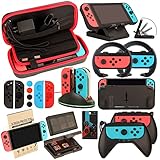
When you buy a console, you need five things on day one and none of them come in the box: a case, a screen protector, something to improve the grip, cable management, and storage for game cards. Buying those individually means five decisions and five shipping waits. The RTop 23-in-1 bundle collapses that into a single purchase, and it is aimed squarely at the person who has just unboxed a Switch and wants to be ready to travel with it that evening.
Key specs
- Contents: 23 pieces in one kit — carrying case, tempered glass screen protector, Joy-Con grips, thumb grip caps, charging and data cables, game card storage, dust plugs and similar accessories
- Case: hard-shell travel case with room for the console and a selection of accessories
- Fit: built around Switch 1 / OLED dimensions
- Format: a starter kit rather than a specialist upgrade
What it does well
The convenience argument is real. A hard-shell case, a glass protector and a pair of grips are the three items almost every Switch owner ends up buying in the first month, and getting them together removes the risk of ordering a case that does not fit the console or a protector that does not match the model. For a gift purchase especially, one box that covers the basics is far more useful than one premium accessory.
The bundle also fills the small gaps that nobody thinks about until they need them: thumb caps that make small sticks easier to control, a card case for physical games that would otherwise live loose in a bag, and cable management so the charging brick is not a tangle. None of it is best-in-class individually, but as a single purchase that gets a new owner fully equipped, it is efficient.
Pros
- Covers case, screen protection, grips and storage in one order
- Removes the risk of buying a case or protector that does not fit
- Strong gift option for a new console owner
- Thumb caps and card storage address small annoyances cheaply
- Everything arrives together, so the console is travel-ready immediately
Cons
- Every component is a mid-tier version of something available better individually
- Some pieces will go unused, so the effective value is lower than the piece count suggests
- Built for Switch 1 / OLED dimensions, not Switch 2
- Upgrading one item later means owning a duplicate
- Premium tier for a bundle, which only pays off if you actually need most of it
How it compares
Against buying the PowerA Comfort Grips and the daydayup 3-pack separately, the bundle wins on convenience and loses on quality — the standalone grips are a more considered ergonomic design, and the standalone glass pack gives you more spares. If you are setting up a second console for a child, or buying a gift, the bundle is the easier call. If you already own a case and a protector, buy the two standalone items and skip it.
10. Samsung microSD Express Card, 256GB – Best for Switch 2 Storage Expansion

This is the one accessory on the list that is not optional in the way the others are. Switch 2 requires microSD Express cards for expanded storage — the standard UHS-I microSD cards that worked in the original Switch and OLED will not serve as game storage on the newer console. If you plan to buy more than a handful of digital games, a 256GB Express card is the practical starting point.
Key specs
- Capacity: 256GB
- Interface: microSD Express — the faster interface the Switch 2 requires for game storage
- Speed class: SD Express read speeds measured in the hundreds of megabytes per second, many times faster than UHS-I microSD
- Brand: Samsung, a long-established name in flash memory and storage
- Compatibility note: original Switch and OLED use standard microSD and cannot take advantage of Express speeds
What it does well
The important part is the interface, not the badge. Switch 2’s internal storage fills quickly once you start downloading, and microSD Express is what the system accepts for expansion. A 256GB card is a sensible middle size