Best Portable TVs for Travel and Small Spaces
What's inside
- Top 3 Picks
- Quick Comparison
- How We Chose
- 1. Monster Vision 2 – Best for All-in-One Travel Entertainment
- 2. LG StanbyME 2 – Best for Wireless, Design-Forward Small Spaces
- 3. ApoloSign 32 Inch 4K UHD Smart Portable TV on Wheels – Best for a Rolling Big-Screen 4K Setup
- 4. GFF Smart Portable TV – Best for a Mid-Size Touchscreen With App Support
- 5. HORION 32″ Portable Smart TV – Best for a Big Screen That Stays Plugged In
- 6. Tyler 14″ Portable TV – Best for Over-the-Air Reception and Packable Travel
- How to Choose
- Top 3 Picks
- Quick Comparison
- How We Chose
- 1. Monster Vision 2 – Best for All-in-One Travel Entertainment
- 2. LG StanbyME 2 – Best for Wireless, Design-Forward Small Spaces
- 3. ApoloSign 32 Inch 4K UHD Smart Portable TV on Wheels – Best for a Rolling Big-Screen 4K Setup
- 4. GFF Smart Portable TV – Best for a Mid-Size Touchscreen With App Support
- 5. HORION 32″ Portable Smart TV – Best for a Big Screen That Stays Plugged In
- 6. Tyler 14″ Portable TV – Best for Over-the-Air Reception and Packable Travel
- How to Choose
As an Amazon Associate I earn from qualifying purchases. This post may contain affiliate links at no extra cost to you.
For most people shopping for a portable TV in 2026, the best overall pick is the LG StanbyME 2. It is a 27-inch wireless touchscreen with a built-in battery and a folio cover, and because the screen detaches from its rolling stand, it moves from a nightstand to a kitchen counter to a guest room without a cable run — which is exactly what “portable” should mean for a renter, a small apartment, or a household that wants one screen that follows the person rather than the room. It suits buyers who care about build quality and don’t need over-the-air reception. If the budget is tighter, the Monster Vision 2 packs a 15.6-inch 1080p display, a 60-watt speaker system, and up to 25 hours of playback into an all-in-one case, making it the better travel and camping companion. If the goal is a large 4K picture that can still be wheeled between rooms, the ApoloSign 32-inch 4K UHD model is the one to examine. The rest of this guide compares screen size, weight class, battery runtime, connectivity, and reception so you can match the set to how you will actually use it.
Our Top Picks
 LG 27-Inch StanbyME 2 Portable Touch Screen TV27 Inches15.7 x 24.5 x 49.8 inches33.5 PoundsCheck on Amazon
 Tyler 14” Portable TV LCD Monitor 1080P Rechargeable14 inches6 x 14 x 14.1 inches5 poundsCheck on Amazon



Top 3 Picks
Best Overall: LG StanbyME 2
The StanbyME 2 is the most complete expression of “portable TV” in this roundup: a 27-inch touchscreen that runs on its own battery, detaches from its stand, and travels under a folio cover like a very large tablet. It suits small-space renters, kitchen-and-bedroom movers, and anyone who wants a premium panel that never needs a wall mount or a permanent cable path. The trade-off is price and a screen size capped at 27 inches.
Best Budget: Monster Vision 2
The Monster Vision 2 wins on value by bundling three things separately sold elsewhere — a 15.6-inch 1080p screen, a 60-watt speaker system, and up to 25 hours of battery playback — into one carry-ready unit. It suits road trips, dorm rooms, backyard movie nights, and camping where a car or power station is nearby. If you specifically want over-the-air channels rather than streaming, the Tyler 14-inch is the budget alternative.
Best for a Rolling Big-Screen Setup: ApoloSign 32-Inch 4K
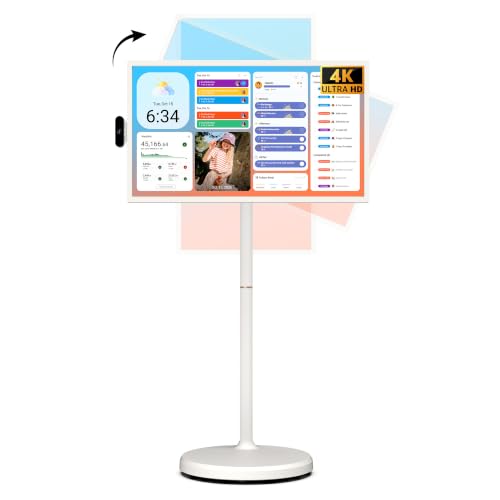
ApoloSign takes the opposite approach to portability: instead of making the screen small and light, it puts a 32-inch 4K panel on wheels with a built-in 15,000 mAh-class battery, Android 16 with EDLA certification, and 256 GB of storage. It suits buyers who move a screen between rooms or out to a patio on flat ground rather than carrying it in a bag. It is premium-priced, and it is not the set to take up a trail.
Quick Comparison
The table below covers every model in this roundup. Price tiers are general market bands rather than fixed figures, because listing prices move constantly.
| Product | Best for | Key specs | Price tier |
|---|---|---|---|
| Monster Vision 2 | All-in-one travel and camping entertainment | 15.6″ 1080p display; 60 W speaker system; up to 25 hours playback; all-in-one portable system | Budget |
| LG StanbyME 2 | Wireless, design-forward small spaces | 27″ touchscreen; built-in battery; detachable panel; folio cover; rolling stand; webOS smart platform | Premium |
| ApoloSign 32″ 4K UHD on Wheels | Large-format 4K that still rolls | 32″ 4K UHD; Android 16, EDLA certified; 256 GB storage; built-in 15,000 mAh-class battery; wheeled stand | Premium |
| GFF Smart Portable TV | Mid-size touchscreen with app support | 22″ 1080p; touchscreen; EDLA certified Android; wheeled stand | Mid-range |
| HORION 32″ Portable Smart TV | Big screen, no battery, always plugged in | 32″ class; smart platform; non-touchscreen; movable stand; no battery | Mid-range |
| Tyler 14″ Portable TV | Over-the-air reception and true packable travel | 14″ 1080p LCD; rechargeable lithium battery; two antennas; HDMI, USB, RCA; FM radio | Budget |
How We Chose
This roundup is built from published product specifications, listing details, and established facts about how each category of screen behaves, not from hands-on use. Four criteria drove the selections. First, spec completeness: a model had to state its screen size, resolution, power source, and stand or mounting approach clearly enough for a buyer to plan around it. Second, category fit: each pick had to solve a genuinely different portability problem — carry it, roll it, detach it, or park it. Third, use case: we weighted battery runtime, weight class, and input options according to where the set would realistically live, because a screen that is perfect on a kitchen counter can be useless in a tent. Fourth, upgrade path: we favored models whose platform, storage, or connectivity leaves room to add a streaming stick, an external antenna, or a soundbar later instead of forcing a replacement. Models that duplicated another pick’s strengths without adding anything new were left out.
1. Monster Vision 2 – Best for All-in-One Travel Entertainment
As an Amazon Associate we earn from qualifying purchases at no extra cost to you.
The Monster Vision 2 is the pick for anyone who wants one object that handles picture, sound, and power at the same time. It is designed as a portable entertainment system rather than a bare panel: a 15.6-inch 1080p display, a 60-watt speaker system, and a stated runtime of up to 25 hours of playback on a single charge. That combination points at a specific buyer — someone who wants a screen for a road trip, a dorm room, a bedroom without a wall mount, or a campsite where a car or power station is within reach.
It suits frequent travellers and casual viewers far more than it suits anyone chasing the biggest possible picture. Fifteen-point-six inches is roughly the size of a large laptop screen, which is enough for two people sitting close and enough for one person at a desk or on a couch arm. It is not a living-room replacement, and it is not the model to choose if over-the-air channels are your priority.
Key specs
- Display: 15.6-inch panel at 1920 × 1080 (1080p)
- Audio: integrated 60 W speaker system
- Power: built-in battery, up to 25 hours of playback as stated
- Format: all-in-one portable entertainment system with an integrated carry design
- Inputs: class-typical HDMI and USB connectivity; confirm the exact port list on the listing before buying
- Mounting: self-supporting enclosure, no wall mount required
Why the numbers matter more than they look
Two figures separate this model from a generic portable panel. The first is 60 watts of audio. Most 15- to 16-inch portable screens output somewhere in the 5-to-15-watt range, which is fine for a bedroom and useless at a campsite where wind, conversation, and distance eat the sound. Sixty watts is loud enough to fill a small room or carry across a patio table, and it removes the need to pack a separate Bluetooth speaker — a real saving in bag space and setup time.
The second is the 25-hour runtime. Run the arithmetic and it tells you something the marketing line does not: 25 hours of playback at a realistic 10-to-15-watt average draw for a screen this size implies roughly 250 to 375 watt-hours of usable energy on board. That is the same energy class as a mid-size portable power station. It also means the unit carries real weight, so treat it as a two-hand carry rather than something you slip into a backpack pocket alongside a laptop.
Where it compares with the nearest alternative in this list, the choice is simple. Against the Tyler 14-inch, the Monster wins on screen area, sound, and runtime by a wide margin, while the Tyler wins on over-the-air reception, physical inputs, and packability. Against the GFF 22-inch, the Monster is more portable and self-contained but gives up four inches of diagonal and the Google-certified Android app platform. Buy the Monster if you stream and want big sound without accessories; buy one of the others if you need channels or apps built in.
Pros
- Screen, speakers, and battery in one unit — nothing extra to pack
- Up to 25 hours of stated playback, far beyond typical battery panels
- 60 W of built-in audio removes the need for a separate speaker
- 1080p on a 15.6-inch panel gives a genuinely sharp, dense image at close range
- Budget tier pricing for a three-in-one package
Cons
- 15.6 inches is small for shared viewing beyond two people
- Long runtime implies a heavy battery pack — not a one-hand carry
- No indication of a built-in over-the-air tuner, so live channels need an external source
- Small-screen streaming at 1080p is fine, but there is no 4K option here
- Port selection should be verified against your devices before ordering
2. LG StanbyME 2 – Best for Wireless, Design-Forward Small Spaces

The LG StanbyME 2 is the most polished interpretation of a portable TV on this list. It pairs a 27-inch touchscreen with a folio cover and a stand, and the panel detaches so it can be used away from the base. LG built the StanbyME line around the idea that a television should move through a home the way a tablet does — and the second generation leans further into that by making the screen itself the portable part, with the folio cover acting as protection and as a stand when you set it down.
It suits renters who cannot drill into walls, studio apartment dwellers who want one screen for the bed and the kitchen, and buyers who value industrial design as much as picture quality. It also suits households where the “TV” is really a shared second screen for recipes, video calls, workouts, and streaming. It does not suit anyone who needs a 32-inch-plus picture, a built-in tuner for antenna channels, or a screen they can throw in a car trunk without a case.
Key specs
- Display: 27-inch touchscreen, 1080p class
- Portability: panel detaches from the stand; folio cover for transport and tabletop use
- Power: built-in battery for off-stand use, with the stand supplying power when docked; expect a few hours per charge, the norm for battery panels at this size — confirm the exact figure on the listing
- Platform: LG’s webOS smart system with the usual streaming app library
- Stand: rolling base with height, tilt, and rotation adjustment
- Connectivity: wireless screen mirroring plus physical inputs on the stand
Where the design earns its price
Most portable TVs solve one problem — getting a picture somewhere without a wall. The StanbyME 2 solves three at once. The rolling stand means you move it without lifting it. The detachable panel means you can carry the screen to a counter, a treadmill, or a bathtub ledge and leave the base behind. The folio cover means the detached panel survives being set down, propped up, and moved again.
That three-mode flexibility is what justifies the premium tier. A fixed portable panel gives you one viewing position; a rolling set gives you any position on one floor; a detachable screen gives you any position in the house. For a small apartment where the same room is the office, the dining room, and the living room, that flexibility is worth more than four extra inches of diagonal.
The touchscreen matters more than it sounds. On a 27-inch panel, touch turns the set into something you interact with rather than just watch — tapping through a recipe, pausing a workout video, scrolling a map, or running a video call without hunting for a remote. Combined with webOS, it behaves like a large tablet that happens to have a television’s app library.
Against the nearest alternative in this list, the ApoloSign 32-inch 4K, the trade is size and resolution versus mobility and finish. ApoloSign gives you five more inches, 4K detail, Android 16 with EDLA certification, and 256 GB of storage. The StanbyME 2 gives you a lighter, smaller footprint, a detachable screen the ApoloSign does not offer, and a more refined stand. If you move a screen ten feet at a time, take the LG. If you roll it across a house or onto a patio, take the ApoloSign.
Pros
- Detachable 27-inch touchscreen that works away from its stand
- Folio cover protects the panel in transit and props it up on a table
- Rolling stand with height, tilt, and rotation adjustment
- webOS platform with a full streaming app library and no dongle required
- Premium build and finish that looks intentional in a living space
Cons
- Premium pricing — the most expensive way per inch of screen on this list
- 27 inches is the ceiling; no larger configuration exists
- Battery runtime is measured in hours off the stand, not days
- No 4K option at this size
- Detached screen is a two-hand carry, not something you toss in a daypack
3. ApoloSign 32 Inch 4K UHD Smart Portable TV on Wheels – Best for a Rolling Big-Screen 4K Setup

ApoloSign approaches portability from the opposite direction to everyone else: instead of shrinking the screen, it puts a full 32-inch 4K UHD panel on a wheeled stand and gives it a built-in 15,000 mAh-class battery. The result is a television you roll rather than carry — from living room to bedroom, from bedroom to patio, from office to conference corner — without unplugging anything or losing the picture mid-move.
It suits buyers with flat floors and a genuine need for a big screen in more than one place: renters who move a lot, households that watch on a patio in summer, small businesses that need a display for a booth or a meeting room, and anyone who wants Android apps and 4K resolution in a package that does not require a wall mount. It does not suit tent campers, backpackers, or anyone who needs to lift the set onto a shelf regularly.
Key specs
- Display: 32-inch 4K UHD panel
- Platform: Android 16, EDLA certified — a Google-certified build with the Play Store and Google services, not a generic Android fork
- Storage: 256 GB internal — unusually large for a television, and enough for substantial offline downloads
- Power: built-in 15,000 mAh-class battery plus AC power when parked
- Mobility: integrated wheeled stand
Why 4K on a 32-inch screen is not wasted
There is a common claim that 4K is pointless below 40 inches. That is only true at living-room distances. The rule of thumb is that 4K detail becomes visible at roughly one to one-and-a-half times the screen diagonal, and 1080p stays comfortable out to about two to two-and-a-half times the diagonal. On a 32-inch panel, that means 4K is fully resolved when you sit within about 32 to 48 inches — which is exactly where a rolling screen ends up in a bedroom, a kitchen, a dorm, or at a desk. At eight feet away, the extra resolution disappears; at three feet, it is obvious. This model is built for the three-foot case.
The EDLA certification is the other detail worth understanding. Android televisions come in two broad flavours: certified builds that ship with Google Mobile Services and the Play Store, and uncertified builds that rely on sideloaded apps or a limited third-party store. EDLA certification means the mainstream streaming apps are present, updated through the normal channels, and behave the way you expect. Combined with 256 GB of storage, it also means you can download a large library for a trip and watch it without any network at all.
The battery deserves a realistic expectation rather than a marketing one. Run the math: 15,000 mAh at a 3.7-volt nominal cell voltage is about 55.5 watt-hours, and after conversion losses you can realistically draw something in the mid-40s. A 32-inch LED panel at normal backlight draws roughly 35 to 50 watts, so a full charge delivers somewhere around one to one and a half hours of playback. Drop the backlight to half and you can stretch that toward two hours. Treat the battery as a way to move the set between outlets and survive a short power cut, not as an all-evening power source.
Against the nearest alternative, the HORION 32-inch, the difference is straightforward. Both are 32-inch smart sets on movable stands, but ApoloSign adds 4K resolution, a battery, Android 16 with EDLA certification, and 256 GB of storage, while HORION strips the battery out and keeps the price in the mid-range tier. If the set will always live near an outlet, the HORION saves money. If it needs to move without going dark, the ApoloSign is the one.
Pros
- 32-inch 4K UHD panel — the sharpest picture in this roundup at close range
- Android 16 with EDLA certification and full Play Store access
- 256 GB of storage for offline downloads, far beyond typical smart TVs
- Built-in battery plus wheeled stand for true outlet-free repositioning
- No wall mounting, no permanent cable run, no installation
Cons
- Premium pricing
- Battery runtime is roughly one to two hours, not a full evening
- Wheels only help on smooth, flat surfaces — carpet and gravel fight back
- 32 inches and a battery pack make this a roll-and-lift, never a carry
- Overkill for a buyer who only ever watches from one seat
4. GFF Smart Portable TV – Best for a Mid-Size Touchscreen With App Support

The GFF Smart Portable TV sits in the middle of this list on purpose. It pairs a 22-inch 1080p touchscreen with a wheeled stand and an EDLA-certified Android platform, which puts it in the small group of sets that are both genuinely movable and genuinely smart. It suits dorm rooms, small apartments, kitchen counters, home offices, and guest rooms — anywhere a 22-inch picture is enough and a full-size television is too much furniture.
The buyer for this model is someone who wants touch input and real streaming apps without paying the premium tier. Twenty-two inches is the sweet spot between a tablet that feels cramped and a 32-inch panel that needs a dedicated corner. The wheeled stand means it can follow you between the bedroom and the living area without being unplugged and re-hung.
Key specs
- Display: 22-inch 1080p touchscreen
- Platform: EDLA-certified Android with Google services and Play Store access
- Mobility: integrated wheeled stand
- Input: touch, plus the usual remote and casting options of a certified Android set
- Power: AC-powered; treat battery operation as a feature to confirm on the listing rather than assume
What 1080p at 22 inches gets you
Pixel density is where a smaller screen earns its keep. At 22 inches, a 1080p panel delivers roughly 100 pixels per inch — noticeably denser than the same resolution stretched across 32 inches, and dense enough that text, subtitles, and interface elements stay crisp at close range. Since this is a touchscreen, that sharpness matters more than it would on a passive panel: you are reading menus, tapping buttons, and scrolling with your fingers at arm’s length, not squinting from a couch.
The EDLA certification is the reason this model beats a generic Android panel at a similar price. Certified builds get the Play Store, regular app updates, and the standard casting protocols, which means the set works with the streaming subscriptions you already pay for instead of asking you to sideload APKs and hope. For a dorm or a rental, that is the difference between a screen that just works and a weekend project.
The honest limitation is battery. The listing describes a wheeled smart set rather than a battery-first design, so plan on keeping an outlet within reach unless the product page explicitly states otherwise. If outlet-free operation is a hard requirement, the ApoloSign 32-inch 4K is the upgrade path, and if you want a smaller battery-powered screen with over-the-air reception, the Tyler 14-inch covers that job for less.
Against the nearest alternative, the HORION 32-inch, the choice comes down to size versus features. HORION gives you ten more diagonal inches and a lower mid-range price, but it is non-touchscreen and has no battery. GFF gives you touch input, a certified app platform, and a footprint that fits on a desk or beside a bed. If the screen lives in one place, go bigger with HORION. If it moves and you want to interact with it, GFF is the better fit.
Pros
- 22-inch touchscreen — a practical size for desks, counters, and small rooms
- EDLA-certified Android with Play Store access and mainstream app support
- Wheeled stand makes it movable without a mount or a second person
- 1080p at 22 inches gives high pixel density and crisp text
- Mid-range pricing for a certified smart platform
Cons
- 22 inches is small for group viewing beyond two or three people
- No 4K option
- Battery operation is not the headline feature — verify before relying on it
- Wheels need smooth flooring to be useful
- Less storage and headroom than the premium Android model above
5. HORION 32″ Portable Smart TV – Best for a Big Screen That Stays Plugged In

The HORION 32-inch is the value play for anyone who wants a large picture that can still be repositioned. It is a 32-inch smart television on a movable stand with no battery and no touchscreen, which sounds like a subtraction until you look at what it buys: a big screen at a mid-range price, no battery to age or replace, and no runtime limit because it is always drawing from the wall.
It suits buyers who move a screen between two or three known outlet locations — a living room and a bedroom, an office and a spare room, a shop floor and a back counter. It also suits anyone who has been put off portable sets by battery anxiety, because this model sidesteps that entirely. It does not suit campers, tailgaters, or anyone whose viewing spot has no power within reach.
Key specs
- Display: 32-inch class panel, non-touchscreen
- Platform: smart TV system with the usual streaming apps and casting
- Power: AC only — no battery, no runtime limit
- Mobility: movable stand for repositioning within reach of an outlet
- Input: remote-based control; no touch layer
The case for leaving the battery out
Batteries are the most common long-term disappointment in portable electronics. Lithium cells lose capacity with every cycle and with every summer spent at high temperature, and a television’s battery is expensive to replace relative to the set’s value. Removing it does three things: it cuts weight, it cuts cost, and it removes the single component most likely to make the product feel old in three years. For a screen that lives indoors and moves a few times a month, that is a sensible trade.
There is a second, less obvious benefit. Without a battery, there is no runtime math to plan around — no calculating whether a movie will finish before the charge does, no topping up before guests arrive, no degradation curve to track. The set is either near a socket or it isn’t, and that binary is easier to live with than a runtime estimate for a lot of households.
Thirty-two inches is also the size where a screen stops feeling like a compromise. At a typical eight-foot viewing distance, a 32-inch panel fills a comfortable portion of your field of view without dominating a small room, and it is large enough for two or three people to watch together. On the resolution question, a 32-inch 1080p panel viewed from eight feet is perfectly adequate; the case for 4K at this size only holds when you sit within about four feet, which is what the rolling 4K model above is designed for.
Against the nearest alternative, the GFF 22-inch, HORION trades touch input and a smaller footprint for ten extra diagonal inches at a similar price tier. If your viewing distance is more than four feet and you control the set with a remote, HORION is the better picture per dollar. If you want to tap the screen, fit it on a desk, and carry it more easily, GFF wins. Against the ApoloSign 32-inch 4K, HORION is the cheaper, lighter, cord-dependent version of the same idea — the right call if the set never needs to run unplugged.
Pros
- 32-inch screen at a mid-range price — the best size-per-cost ratio here
- No battery means no degradation, no replacement cost, and no runtime limits
- Lighter and simpler than battery-equipped 32-inch sets
- Smart platform with standard streaming and casting support
- Movable stand makes it repositionable without mounting hardware
Cons
- Requires an outlet — unusable for camping, tailgating, or outage backup
- Non-touchscreen, so all interaction runs through a remote
- No 4K resolution
- Moving it still means lifting 32 inches of panel, not rolling it hands-free
- No offline storage advantage over a streaming stick
6. Tyler 14″ Portable TV – Best for Over-the-Air Reception and Packable Travel

The Tyler 14-inch is the only set in this roundup built primarily around receiving broadcasts rather than streaming them. Its listing describes a 14-inch 1080p LCD monitor with a rechargeable lithium battery, two antennas, HDMI, USB, and RCA inputs, and an FM radio. That combination targets a specific and underserved buyer: the camper, the tailgater, the emergency-preparedness household, and the traveller who wants a screen that works with no Wi-Fi, no account, and no subscription.
It suits anyone who values independence from networks. A 14-inch screen runs for hours on a modest battery, weighs a fraction of a 32-inch set, and can be set up on a picnic table with its own antennas in under a minute. It also suits a kitchen, a garage, or a workshop where a small screen and a radio are genuinely useful. It does not suit a living room, a household that wants a big picture, or anyone who expects built-in streaming apps.
Key specs
- Display: 14-inch LCD, 1080p
- Power: rechargeable lithium battery
- Reception: two antennas for over-the-air channels
- Inputs: HDMI, USB, and RCA, plus FM radio
- Platform: the model name lists no Wi-Fi or app platform — plan on an HDMI streaming stick if you want apps
- Portability: small, light, and self-contained; the most packable option here
Why dual antennas are the headline
Over-the-air reception is a physics problem, and the two biggest variables are distance to the transmitter and multipath — the same signal arriving at the antenna more than once after bouncing off buildings, hills, or a vehicle’s metal shell. Two antennas give the tuner a better chance of resolving a clean signal, because the receiver can compare two samples rather than one. That matters most in fringe areas where a single antenna produces a picture that breaks up every few seconds.
Reception realities are worth setting expectations on. In flat, open terrain with a clear line to a broadcast tower, a small indoor antenna can pull in dozens of channels from 30 to 40 miles away. In a valley, behind a hill, or inside a metal RV, the same antenna may find nothing usable, and the fix is height and an external antenna rather than a different television. A channel scan at each new location is essential — tuners memorize the previous area’s frequencies and will show an empty list until you rescan.
The input set is the second reason to buy this model. HDMI covers a streaming stick, a games console, or a laptop. USB covers a flash drive of files. RCA covers older gear — a DVD player, a camcorder, a legacy console. And FM radio covers the hours when you want audio without a picture, which is more of a camping feature than a living-room one. Few small screens offer all four at this price tier.
Against the nearest alternative, the Monster Vision 2, the trade is capability for size and sound. Monster gives you 15.6 inches of 1080p, 60 watts of audio, and up to 25 hours of playback, but no built-in tuner or FM radio. Tyler gives you over-the-air channels, physical inputs, a radio, and true packability, but a smaller screen, quieter built-in sound, and no app platform. For streaming on a trip, take the Monster. For channels in the middle of nowhere, take the Tyler.
Pros
- Over-the-air tuner with two antennas for free broadcast channels
- Works with no internet connection, no account, and no subscription
- Rechargeable lithium battery and a genuinely packable 14-inch footprint
- HDMI, USB, RCA, and FM radio cover almost every legacy and modern source
- Budget pricing — the lowest entry point in this roundup
Cons
- 14 inches is small for more than one or two viewers
- No built-in streaming platform; apps require an HDMI stick
- Built-in audio is modest compared with the 60 W model above
- Reception depends entirely on terrain and distance to transmitters
- Battery runtime is sized for a few hours, not a full day
How to Choose
Six specifications decide whether a portable TV works for you: screen size, battery capacity, weight class, connectivity, reception hardware, and panel behaviour. Get those right and the brand barely matters. Get them wrong and a perfectly good set becomes a disappointment within a week.
Start with viewing distance, not screen size
Screen size is a distance decision. The working rule is that 1080p stays comfortable from about one and a half to two and a half times the diagonal, while 4K resolves from about one to one and a half times the diagonal. That produces a very different answer depending on where you sit.
| Screen size | Comfortable 1080p distance | Distance where 4K adds detail | Typical use |
|---|---|---|---|
| 14 inches | 21–35 inches | 14–21 inches | One person, tent or camper, tabletop |
| 15.6 inches | 23–39 inches | 16–23 inches | Two people on a couch arm or a bed |
| 22 inches | 33–55 inches | 22–33 inches | Desk, kitchen counter, dorm room |
| 27 inches | 40–68 inches | 27–40 inches | Bedroom, small living room |
| 32 inches | 48–80 inches | 32–48 inches | Two to three viewers, small room |
Read that table honestly. If your couch is nine feet from where the screen will sit, a 32-inch 1080p set is fine and a 4K upgrade at the same size buys you almost nothing. If you are watching from three feet on a bed or a desk, 4K on a 32-inch panel is a real improvement and a 14-inch 1080p screen will look sharper than you expect because the pixels are packed tightly.
Do the battery math before you trust a runtime claim
Battery capacity in milliamp-hours tells you almost nothing on its own, because runtime depends on how much power the screen draws. Convert to watt-hours first: watt-hours equals milliamp-hours divided by 1,000, multiplied by the nominal cell voltage — usually 3.7 volts for lithium cells. Then divide by the panel’s average draw and subtract 15 to 20 percent for conversion and cutoff losses.
Worked example: a 15,000 mAh battery at 3.7 volts stores about 55.5 watt-hours. After losses, call it 45 usable watt