Best Fine-Tooth Jigsaw Blades for Clean, Precise Cuts
What's inside
As an Amazon Associate I earn from qualifying purchases. This post may contain affiliate links at no extra cost to you.
The best fine-tooth jigsaw blade for clean, precise cuts is usually a high-carbon steel or bi-metal blade with 10–20 teeth per inch (TPI): choose 10–12 TPI for plywood and laminate, 14–20 TPI for plastic, and 24–32 TPI for thin metal.
There is no single blade that produces the cleanest cut in every material. Tooth count controls the balance between speed and finish, while blade material determines how long the edge stays sharp. For most woodworking, a reverse-tooth blade gives the cleanest top surface; for metal, use a narrow, high-TPI blade with cutting lubricant and a slower stroke rate.
As an Amazon Associate we earn from qualifying purchases at no extra cost to you.

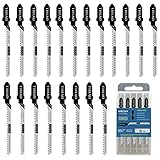


Quick picks by cutting situation
| Situation | Recommended blade | Typical TPI | Why it fits |
|---|---|---|---|
| Clean cuts in plywood | Reverse-tooth high-carbon steel blade | 10–12 | Reduces splintering on the visible top face |
| Laminate countertop or melamine | Down-cut or reverse-tooth blade | 10–14 | Protects the decorative surface from breakout |
| Thin acrylic or PVC | Ground-tooth, low-set blade | 14–20 | Leaves a smoother edge with less chipping |
| Sheet steel or aluminum | Bi-metal metal-cutting blade | 24–32 | Fine teeth prevent snagging and premature tooth loss |
| Occasional household repairs | Mixed-material multipack | 10–32 | Lower initial cost and useful material coverage |
What “fine tooth” means on a jigsaw blade
Fine-tooth blades have more teeth per inch than fast-cutting blades. More teeth generally produce a smoother edge, but they remove less material per stroke and can overheat if you force the saw. Tooth spacing also matters: a blade with 20 TPI is fine for plastic or thin metal, but it may clog in thick wood because the gullets between the teeth cannot clear chips efficiently.
For a fine tooth blade for jigsaw work, match the blade to the material thickness. Aim for at least three teeth engaged in the workpiece at once. A useful rule is:
- 6–8 TPI: fast, rough cuts in thick softwood.
- 10–12 TPI: general plywood, hardwood, and laminate.
- 14–20 TPI: clean plastic cuts and thin wood.
- 24–32 TPI: thin steel, stainless steel, and aluminum.
If a blade has too few teeth for the material thickness, it can catch and chip the surface. If it has too many, dust or metal swarf fills the gullets, slowing the cut and creating heat.
Head-to-head: blade materials
High-carbon steel
High-carbon steel blades are inexpensive and flexible, making them a practical choice for plywood, softwood, laminate, and light plastic work. They are easy to replace when dull, but their teeth wear faster in hardwood, abrasive laminates, and metal. Expect the cutting edge to degrade first; bending or overheating usually happens when the operator pushes too hard.
High-speed steel
High-speed steel teeth resist heat better than ordinary high-carbon steel and are useful for harder plastics and light metal cutting. The trade-off is reduced flexibility. A high-speed steel blade can snap if the jigsaw is twisted during a curve, so it is better for controlled, relatively straight cuts.
Bi-metal
Bi-metal blades combine a flexible alloy-steel body with high-speed steel teeth. They cost more than basic carbon-steel blades, but they tolerate vibration and heat better and are the best all-around option when cutting sheet metal or abrasive materials regularly. For occasional woodworking, the extra durability may not justify the higher purchase price.
Carbide-grit and carbide-tooth blades
Carbide-grit blades are designed for materials that quickly destroy conventional teeth, including fiberglass, cement board, abrasive laminates, and some ceramics. They do not behave like normal toothed blades: they cut more slowly and require steady pressure, but they can outlast steel blades in abrasive stock. Use them only when the material calls for them.
Comparing cut quality across common materials
Plywood
A 10–12 TPI reverse-tooth blade is the strongest choice when the visible face must remain clean. The teeth point partly toward the shoe, so the blade cuts on the downward stroke and reduces top-face splintering. A standard up-cut blade may leave a cleaner underside but can chip veneer on top.
Support the sheet close to the cut line, apply painter’s tape over the layout, and let the blade establish the cut before increasing speed. For thick plywood, choose a longer blade with a working length at least 10 mm greater than the material thickness.
Laminate and melamine
Laminate surfaces are brittle and commonly chip where the blade exits. Use a 10–14 TPI reverse-tooth or down-cut blade, cut with the decorative face upward when the blade cuts downward, and keep the pendulum or orbital action at zero. Orbital action increases speed by moving the blade forward, but it also increases breakout.
Make a shallow scoring pass through the laminate first if the finish is especially fragile. Do not force a dull blade: heat and vibration can melt adhesive layers or widen the cut.
Plastic
For acrylic, PVC, and similar sheet plastics, use a 14–20 TPI blade with small, preferably ground teeth. A coarse blade can grab the sheet and chip the edge; excessive speed can melt it. Clamp the material between sacrificial boards when possible, leave the protective film in place, and use a moderate speed with little or no orbital action.
On very thin plastic, a high tooth count is not automatically better. If the blade has too many teeth, friction rises and the cut may fuse behind the blade. Stop periodically to let the material cool rather than increasing feed pressure.
Thin metal
Use a 24–32 TPI bi-metal blade for sheet steel, stainless steel, or aluminum. The blade should be narrow enough to follow the cut but not so narrow that it twists. Clamp the sheet firmly to plywood or another sacrificial backing; unsupported metal vibrates, damages teeth, and produces a rough edge.
Set the jigsaw to low speed and no orbital action. Apply a small amount of cutting oil to steel, but keep oil away from areas where contamination is unacceptable. Aluminum can clog teeth, so clear the cut frequently and avoid excessive pressure.
Decision matrix: which blade should you buy?
| Your priority | Best choice | Acceptable compromise | Avoid |
|---|---|---|---|
| Lowest budget and occasional use | Carbon-steel multipack with 10–12 and 24–32 TPI blades | Separate general-purpose and metal blades | Buying one blade for every material |
| Best visible face on plywood or laminate | Reverse-tooth blade, 10–14 TPI | Standard blade with masking tape and a scoring pass | High orbital setting |
| Frequent remodeling work | Bi-metal set plus specialty reverse-tooth blade | High-quality carbon-steel set | Very cheap blades used on abrasive boards |
| Curved cuts | Narrow high-carbon or bi-metal blade | General-purpose blade with reduced feed pressure | Wide blade forced around tight corners |
| Maximum edge quality | Ground-tooth or reverse-tooth blade matched to the material | Fine standard-tooth blade and a sanding allowance | Dull or overheated blades |
Setup steps for a cleaner cut
- Check the shank. Most current jigsaws use T-shank blades, but confirm compatibility before buying. A blade that does not lock fully can wobble or eject.
- Choose the tooth direction. Use reverse or down-cut teeth when the top face matters; use conventional up-cut teeth when underside quality is more important.
- Set orbital action to zero. This is especially important for laminate, plastic, metal, and any cut where edge quality matters more than speed.
- Secure the workpiece. Clamp it near the cut without obstructing the shoe. Vibration is a major cause of chipped edges and broken teeth.
- Start at the correct speed. Use moderate speed for wood, lower speed for plastic and metal, and adjust only if the blade is cutting freely without smoke, melting, or discoloration.
- Feed lightly. Let the teeth remove the material. A practical sign of correct pressure is a continuous cutting sound without the motor laboring or the blade flexing sideways.
Ownership costs and common mistakes
Blade life depends more on material and technique than on the printed TPI. A carbon-steel blade used only in plywood may remain useful through several projects, while one used in laminate or nail-contaminated timber can become dull in minutes. Keep wood blades separate from metal blades; even a small metal nick can make a fine woodworking blade wander.
As a simple cost-per-use example, a general-purpose multipack costing roughly $10–$20 and containing 10 blades costs about $1–$2 per blade. If each blade provides four clean plywood projects before replacement, the consumable cost is approximately $0.25–$0.50 per project. A bi-metal metal-cutting blade may cost roughly $3–$8, but replacing it less often can be cheaper than consuming several basic blades on steel.
Replace a blade when it requires noticeably more pressure, leaves burn marks, cuts at an angle despite a square shoe, or produces repeated chipping after the material is properly supported. Cleaning dust from the shoe and air vents, storing blades dry, and removing a blade after use will help prevent corrosion and overheating. For most buyers, the best starting set is a 10–12 TPI reverse-tooth blade for wood and laminate, a 14–20 TPI plastic blade, and a 24–32 TPI bi-metal blade for thin metal.