Best Affordable Digital Angle Gauge for Saw Setup
What's inside
As an Amazon Associate I earn from qualifying purchases. This post may contain affiliate links at no extra cost to you.
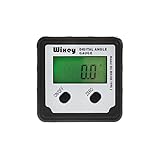
Setting a table saw blade to 90 degrees or matching a miter saw bevel to a known angle does not require an expensive machinist’s instrument. A good digital angle gauge can handle most saw setup work for roughly $20 to $50. The important part is choosing one with a strong magnetic base, a usable display, and accuracy that matches the tolerance of your projects.
The best value is usually a compact digital inclinometer with a 0.1-degree display, a stated accuracy of about ±0.1 degree, and a magnetic bottom. It should also have a zero or relative-angle button so you can measure from the saw table instead of relying only on an absolute level reading.
As an Amazon Associate we earn from qualifying purchases at no extra cost to you.


What to Look For in an Affordable Angle Gauge
Resolution is not the same as accuracy. A gauge may display 0.1 degrees while being off by 0.2 or 0.3 degrees. That is still adequate for many woodworking jobs, but do not assume extra decimal places mean better results. For saw setup, a claimed accuracy of ±0.1 degree is a sensible target. A cheaper gauge rated around ±0.2 degree can still be perfectly serviceable for framing, rough carpentry, and general shop work.
A magnetic base matters because it keeps both hands available while setting a blade or checking a fence. Look for magnets on the bottom and, ideally, on one side. The side magnet is useful for checking a miter saw fence or the face of a metal blade, although it will not stick to aluminum or painted surfaces reliably.
The display should be readable from above and should hold its reading without constant repositioning. A backlight helps in a dim shop, but it can reduce battery life. Automatic shutoff is useful when you forget to turn the tool off, though a very short shutoff can be annoying during setup.
For a general-purpose choice, compare magnetic digital angle gauges with 0.1-degree resolution. Avoid paying extra for a professional surveying-style inclinometer unless you need calibration records, extreme repeatability, or regular work in harsh conditions.
Which Type Offers the Best Value?
| Type | Typical price | Best use | Main drawback |
|---|---|---|---|
| Basic magnetic digital gauge | $15–$30 | Table saw and miter saw setup | Less consistent calibration and weaker magnets |
| Midrange digital inclinometer | $30–$60 | Frequent shop use and repeatable bevel settings | Costs more without always improving accuracy |
| Digital level with angle mode | $25–$70 | Construction work and longer surfaces | Bulky around saw blades and small fences |
| Machinist or industrial inclinometer | $80 and up | Inspection and documented precision | Overkill for ordinary woodworking |
The basic magnetic gauge is the value winner for most homeowners and occasional woodworkers. A midrange tool becomes worthwhile if the cheaper gauge drifts, has a weak magnet, or gives different readings after being removed and replaced. Brand-name tools may offer better buttons, seals, and quality control, but the internal sensors in budget products are often similar. Pay for a better housing and warranty only when you will use the gauge frequently.
How to Use One for Saw Setup
Start by cleaning the saw table and the gauge’s measuring surface. Dust under the gauge can change the reading by several tenths of a degree. Place the gauge on the table, allow the reading to settle, and press the relative-zero button. This removes any slight out-of-level condition in the saw or workbench.
Next, place the gauge against the blade body, not the teeth. Teeth can be ground unevenly and may push the gauge away from the blade. Rotate the blade by hand and check at two or three positions. If the readings change, the blade may be dirty, warped, or not seated correctly on the arbor. Do not use a gauge reading from one tooth as proof that the blade is square.
For a 90-degree setup, tilt the blade until the relative reading is close to zero. Lock the bevel mechanism, then check again. Many saws shift slightly when the lock is tightened. If the reading moves by 0.2 degrees, compensate before locking or adjust the saw’s bevel stop.
For a 45-degree bevel, use the same process after zeroing on the table, but set the blade to approximately 45 degrees. Check both sides of the blade if possible. A difference between the two readings can indicate a dirty blade, a gauge that is not sitting flat, or a saw mechanism that needs adjustment.
On a miter saw, the gauge can check the blade relative to the table and the fence, but it does not replace a reliable square for checking the cut. A blade can read 90 degrees to the table while the fence is slightly out of alignment. Make a test cut in scrap, close the joint, and verify the result.
Common Problems and Buying Mistakes
The most common failure is trusting a low-cost gauge without checking it. Test it on a known flat surface, then rotate it 180 degrees. If it reads nearly the same angle both ways, it is probably consistent. If the readings differ by more than about 0.2 degree, recalibrate it if possible or return it.
Weak magnets are another problem. A gauge that slides down a blade can produce a false reading and create a safety hazard if it contacts the teeth. Never place a gauge on a moving blade, and remove it before starting the saw. For steel saw tables, a stronger magnet is helpful; for aluminum tables, use the gauge as a hand-held reference instead.
Battery warnings are often subtle. A fading display or readings that jump when the backlight is used usually means the battery is nearly exhausted. Keep a spare coin-cell or AAA battery in the tool cabinet, depending on the gauge design. If you want fewer battery concerns, consider a rechargeable digital angle finder with a magnetic base, but confirm that it can still be used while charging if that matters in your shop.
When to Buy and When to Spend More
Digital angle gauges are commonly discounted during spring tool promotions, Father’s Day sales, Black Friday, and the weeks before Christmas. Basic models often drop by $5 to $10, while midrange products may receive bundle discounts with batteries or cases. There is little reason to wait for a seasonal sale if you need one for a current saw adjustment; the price difference is usually modest.
Buy the cheaper option when you set up tools occasionally, work mainly with rough or general-purpose lumber, and can verify the gauge against a square or test cut. Spend more when you make cabinets, furniture, or repeated bevel cuts where a tenth of a degree affects a visible joint. In that case, look at calibratable digital inclinometers and prioritize repeatability over a larger display or extra modes.
For most saw owners, a $20–$40 magnetic digital gauge is the sensible purchase. Verify it before use, zero it on the saw table, check the blade at multiple positions, and confirm important settings with a test cut. Those habits matter more than choosing a gauge with a premium price tag.