Best Budget Angle Finder for Trim and Cabinet Installation
What's inside
As an Amazon Associate I earn from qualifying purchases. This post may contain affiliate links at no extra cost to you.
Trim and cabinet work rarely fails because the saw cannot cut. It fails because the angle was measured from the wrong surface, the tool shifted, or a compound corner was treated like a simple miter. A budget angle finder can prevent those mistakes, but the cheapest tool is not always the best value.
For most homeowners and occasional installers, the sensible target is a basic digital angle finder or a locking bevel gauge costing roughly $15 to $35. A professional doing repeated cabinet installations may save time with a more rugged digital model, but spending $60 or more only makes sense if the tool has features you will actually use.
As an Amazon Associate we earn from qualifying purchases at no extra cost to you.



What type of angle finder should you buy?
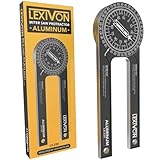
There are three useful categories. A digital angle finder uses an electronic inclinometer and displays the angle, usually to 0.1 degree. It is fast and easy to read, especially when checking a wall corner or transferring an angle to a miter saw. Search for a digital angle finder bevel gauge if you want the most versatile budget option.
A sliding T-bevel has two arms that pivot and lock. It does not tell you the number of degrees, but it copies an angle directly from the wall or existing trim. This is often the better tool for one-off repairs, because you can place it against the corner and carry it to the workpiece without calculating or remembering a reading.
A dedicated corner angle finder has two arms and a scale designed for inside and outside corners. Some models include a built-in miter calculator. These are convenient for trim, but inexpensive versions can have loose pivots and inaccurate scales. They are worthwhile when you install lots of baseboard or crown molding, not necessarily for a single room.
Budget angle finder comparison
| Tool type | Typical street price | Best use | Main weakness |
|---|---|---|---|
| Basic sliding T-bevel | $8–$18 | Copying an existing corner or trim angle | No direct numerical reading |
| Digital angle finder | $15–$35 | Measuring, transferring, and checking angles | Needs batteries and a stable reference surface |
| Digital angle finder with magnets | $20–$45 | Working against saw blades, metal fences, and steel surfaces | Magnets do little on wood or painted surfaces |
| Corner angle finder with miter scale | $15–$35 | Repeated baseboard and molding layout | Scale and pivot quality vary widely |
| Professional digital bevel box | $50–$100+ | Frequent installation and jobsite use | High cost for occasional DIY work |
Features worth paying for
Look first for a readable display, a zero or calibration button, and a locking function. The ability to zero the tool on any surface is more important than an advertised absolute accuracy figure. You can place the finder on a cabinet side, press zero, and then compare the adjacent panel or wall.
A hold button is useful when the display becomes difficult to see inside a cabinet. Magnets help when checking a steel miter-saw blade or fence, but they do not make a difference on MDF, plywood, drywall, or painted trim. A protective case is valuable because a fall can change the reading even when the screen still works.
Most budget digital units claim accuracy around 0.1 degree or 0.2 degree. Treat those numbers as optimistic. For trim, the more meaningful test is repeatability: take the same measurement five times. If the readings vary by half a degree or more, the tool is not reliable enough to guide a tight joint without additional test cuts.
Using an angle finder for trim
Do not assume a corner is exactly 90 degrees. A wall corner measuring 88 degrees needs two trim pieces cut at approximately 44 degrees each only if the corner is symmetrical. In older houses, it may not be. The best method is to measure the actual corner, divide the angle as a starting point, and make a test cut using scrap material.
For an inside corner, press the finder firmly into both walls without forcing it open. Drywall paper, caulk, and rounded joint compound can change the reading by 1 or 2 degrees. If the corner is irregular, a T-bevel often works better because it copies the physical shape rather than pretending the corner is a perfect geometric line.
For crown molding, the wall angle is only part of the problem. Spring angle, molding orientation, and whether the cut is nested or flat all affect the saw setting. A budget angle finder can measure the corner, but it cannot eliminate the need for test pieces. Keep several short scraps of the actual molding for setup.
Using one for cabinets
Cabinet installation benefits from a digital finder because you can check walls, cabinet sides, and shelves separately. A wall that leans 2 degrees may need a scribe rather than a forced cabinet installation. If you push the cabinet into alignment without checking, doors can bind and reveals can vary from top to bottom.
Use the finder on a clean, flat reference surface. Sawdust under one end, a rounded cabinet edge, or a protruding screw can produce a false reading. On plywood and MDF, hold the tool in place rather than relying on magnets. Take readings at the top and bottom of a wall; a corner can be square at the floor and several degrees different near the ceiling.
When the cheap option is enough
A $10 sliding bevel is fine for copying one existing angle, fitting a replacement baseboard, or transferring the angle from an old cabinet filler. It has no batteries, is quick to reset, and can remain useful for decades if the pivot stays tight. For a basic DIY project, it is often the lowest-cost tool that solves the actual problem.
Choose a budget digital model when you need numerical readings, repeated checks, or a quick way to compare surfaces. A magnetic digital angle finder is a practical upgrade if you regularly use a metal miter saw or table saw fence.
Pay more for a professional unit only when the tool will see frequent jobsite use. Better housings, stronger magnets, sealed buttons, and more consistent calibration matter to installers, but they do not make a bad cut impossible. For seasonal projects, prices often dip around major holiday sales and during spring remodeling promotions. Compare the actual features rather than buying a premium model simply because it is discounted.
A practical buying checklist
Before ordering, confirm the tool can measure both relative and absolute angles, has a visible zero button, and includes batteries if it is digital. Check the arm length on a T-bevel: very short arms are awkward on wide trim, while excessively long arms can be difficult to fit inside cabinet corners. Read reviews for complaints about loose pivots, drifting displays, and poor battery compartments.
Whichever tool you choose, verify it against a known 90-degree square before trusting it on finished material. Measure, mark, make a scrap cut, and adjust from the test fit. That three-minute check is worth more than paying for an expensive angle finder.