Best Budget Digital Caliper for Home Machining and Repairs
What's inside
As an Amazon Associate I earn from qualifying purchases. This post may contain affiliate links at no extra cost to you.
A budget digital caliper is useful for checking shaft diameters, drill bits, stock thickness, and repair parts. For home machining, it is a layout and inspection tool—not a substitute for a micrometer when a close fit depends on a few thousandths of an inch. A sensible first buy is usually a basic 6-inch caliper with a metal body, a clear display, and a zero button you can reach easily.
As an Amazon Associate we earn from qualifying purchases at no extra cost to you.


What to buy for home use
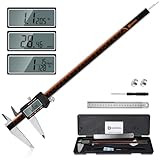
For most benches, a 6-inch digital caliper is the practical size. It measures outside dimensions, inside openings, and step depths, and fits in a drawer without fuss. A 4-inch tool can be handy for small electronics or model work, but its shorter range is limiting for general repairs. An 8-inch caliper reaches farther, though budget versions can flex more and are less convenient to store.
Look for stainless steel jaws, a thumb roller, a locking screw, and a display that shows at least 0.01 mm or 0.0005 inch resolution. Resolution is not accuracy: a display that changes in half-thousandths does not mean the tool reliably measures to that tolerance. Budget calipers commonly claim accuracy around ±0.001 inch; treat that as a best-case specification, not a guarantee for every reading or every tool.
A straightforward 6-inch stainless digital caliper is enough for measuring lumber hardware, brackets, tubing, and general-purpose machine parts. Pay for better construction only if you will use it often or need repeatable measurements.
Budget caliper options compared
| Type | Typical price range | Best for | Main trade-off |
|---|---|---|---|
| Basic digital, plastic or mixed construction | $10–$20 | Occasional household repairs and rough sizing | More flex; battery and zero behavior can be inconsistent |
| 6-inch stainless digital | $20–$40 | General bench work and hobby machining | Still needs careful handling and verification |
| Dial caliper | $25–$60 | Users who want a battery-free tool | Harder to read at a glance; gear rack can collect debris |
| Entry-level micrometer | $25–$60 | Close checks on shafts and small stock | Measures a narrower range and takes longer to use |
Prices vary by brand, seller, and season; these are broad shopping ranges, not promises. A low-cost caliper can be perfectly adequate for sorting fasteners or checking whether a piece is roughly 12 mm or 1/2 inch. If the measurement decides whether a bearing fits, spend the time to verify it with a micrometer or another known standard.
How to check a budget caliper
Before relying on any new caliper, wipe the jaws clean and close them gently. The display should return to zero without pressure. Open and close it several times; a reading that wanders by more than one display increment deserves caution. Check the outside jaws against a known gauge block, drill shank, or accurately measured part. A drill bit’s labeled size is not a calibration standard, but it can reveal a large error.
Check inside measurements separately. The small inside jaws are easy to tilt, and a slight angle can change the reading by several thousandths. For a bore, rock the tool gently to find the widest reading, then repeat. Do not force the jaws into a hole: pressure can spread them or make the reading look smaller. Use the depth rod only on a flat surface, with the caliper square to the work.
Temperature matters in close work. Warm the tool and part to the same room temperature before measuring; holding a small steel part can heat it enough to shift a fine reading. Keep chips and abrasive dust off the beam. A single chip between the jaws can create a false measurement, while coolant or water can damage an inexpensive electronic module.
Digital, dial, or micrometer?
Digital calipers are quick and easy to switch between inch and metric readings. Their weak point is the electronics: some inexpensive models drain batteries while stored, flicker, or lose zero after a bump. Keep a spare battery, remove it before long storage if the tool has a drain problem, and re-zero before each job. A second inexpensive battery is usually better value than paying a large premium for features you do not need.
A 6-inch dial caliper avoids battery trouble and gives a continuous reading, but the pointer and rack need protection from grit. For repetitive work in a dusty shop, a dial tool may be the better bargain. For quick measurements in mixed inch and metric projects, digital is easier.
For a shaft that must fit a bearing or a turned part with a tight tolerance, use a micrometer. A caliper’s jaws can rock, and hand pressure changes the result. If the allowable variation is around 0.001 inch or less, a micrometer is usually the safer choice. A 0–1 inch outside micrometer covers many small shaft checks; buy a range that matches the parts you actually make.
When to spend more—and when to wait
Buy the basic stainless digital type if you measure occasionally, work to ordinary repair tolerances, and can verify critical dimensions another way. Spend more for a better-finished tool if you measure every day, need consistent readings across repeated parts, or work around coolant. A reputable brand may offer better fit, support, and quality control, but brand alone does not make a caliper accurate. Inspect the jaws and repeatability on arrival.
Prices on common measuring tools often dip during major shopping events and holiday sales, but the savings may be only a few dollars. Compare the final price with shipping and check that the listing includes the case and battery. Avoid buying a no-name caliper solely because its display claims 0.0005-inch resolution. For most home users, clean jaws, stable zero, and a tool that stays protected in its case matter more than extra digits.
Store the caliper closed lightly, not clamped tight, and keep it in its case rather than loose in a toolbox. That simple habit helps protect the measuring faces from dents and grit—the two common ways a cheap tool becomes an unreliable one.