Best Affordable Inspection Camera for Checking Pipes and Wall Cavities
What's inside
As an Amazon Associate I earn from qualifying purchases. This post may contain affiliate links at no extra cost to you.
Checking a blocked drain, lost wire, or suspicious wall cavity does not usually require a professional inspection system. A small camera on a flexible cable can answer the basic question: what is in there, and can you reach it? The best affordable inspection camera is the one with enough cable length, usable lighting, and a screen you can actually see—not necessarily the one with the highest resolution.
As an Amazon Associate we earn from qualifying purchases at no extra cost to you.



What to Look for in an Affordable Inspection Camera
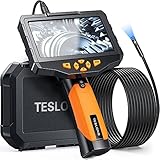
Start with the camera head diameter. A 5.5 mm head is useful for small openings, appliance access, and some narrow plumbing. An 8 mm head is more common and usually offers a brighter image, tougher construction, and a lower price. For household wall cavities, either size works if you can drill or use an existing opening at least 10 mm wide.
Cable length is the next practical limit. A 16-foot cable handles most sink drains, short wall investigations, and automotive work. Choose a 33-foot cable for longer drain runs, but remember that extra length makes the cable harder to push and control. A cheap 65-foot borescope can reach farther, yet its soft cable may coil rather than advance through a pipe.
Look for a camera with adjustable LED lighting, a waterproof camera head rated at least IP67, and a cable that is semi-rigid rather than limp. An IP67 head can tolerate temporary immersion, but that does not mean the handle or display is waterproof. Keep the electronics away from standing water.
For most home jobs, 720p resolution is adequate. A 1080p camera makes cracks, labels, and small objects easier to identify, but it cannot compensate for dirty glass, glare, or a camera lens several inches away from the target. A side-view mirror or detachable hook can be more useful than a resolution upgrade.
Best Budget Inspection Camera Types
| Type | Typical price | Best use | Main compromise |
|---|---|---|---|
| Phone-connected USB camera | $20–$45 | Occasional wall, appliance, and short-drain checks | Depends on phone compatibility and battery |
| Built-in-screen borescope | $40–$100 | General home maintenance and plumbing | Small, basic display and limited recording controls |
| Long-cable inspection camera | $70–$160 | Longer drains, ducts, and deeper cavities | More difficult to push and retrieve |
| Professional articulation camera | $250 and up | Frequent service work and controlled viewing around corners | High cost for occasional use |
A phone-connected USB inspection camera is the cheapest sensible choice when you already own a compatible phone. These cameras are compact and easy to store. However, some Android phones do not support USB On-The-Go, and iPhones may require a particular connector or app. Check compatibility before buying. Phone-based units also drain the phone battery and are awkward when you need both hands to guide the cable.
A built-in-screen unit costs more but is easier on a job. You press the power button and start viewing without pairing, downloading an app, or worrying about notifications interrupting the image. For many homeowners, a 16-foot inspection camera with screen is the best value. It covers common tasks without paying for cable length you will rarely use.
Using a Camera in Pipes and Drains
Inspection cameras are useful for locating a clog, confirming that a trap is clear, or finding a dropped object. They are less reliable for diagnosing the entire condition of a buried sewer line. Low-cost cameras have no locating transmitter, so you can see a problem but may not know its exact position behind a wall or under a floor.
Clean the lens before and after every wet inspection. Grease, soap film, and rust can make a clear camera look defective. Push slowly—about 1 foot every 5 to 10 seconds—and rotate the cable to scan the pipe wall. If the image suddenly turns white, reduce the LED brightness; reflective plastic pipe can overwhelm a small camera sensor.
Do not force the cable around a tight 90-degree fitting. The camera head can separate from the cable, and retrieval becomes difficult. A drain camera is for inspection, not for breaking through a blockage. Use a plunger, auger, or plumber when resistance is firm.
Using a Camera Behind Walls
For wall cavities, drill the smallest practical access hole and check for electrical wiring, plumbing, and insulation before enlarging it. A 3/8-inch to 1/2-inch hole often accommodates a slim camera head, but a thicker 8 mm camera may need a larger opening. An inspection camera can show a wire or pipe without telling you whether it is energized or pressurized, so shut off power and water when appropriate.
Camera cables do not steer well in open cavities. A semi-rigid cable helps, but it may still snag on insulation, nails, or cross-bracing. If you need to look around corners, consider a dual-lens inspection camera. A second lens facing the side can save time, although dual-camera units sometimes have dimmer images and less flexible controls than a simple forward-facing model.
Brand Value and Features Worth Paying For
Brand reputation matters most for cable durability, replacement accessories, battery support, and warranty service. A no-name camera can be perfectly adequate for a one-time wall check, especially below $40. The failure mode is usually not image quality; it is a broken cable near the camera head, a loose charging port, or an app that stops working after a phone update.
Pay extra for a better-known tool brand if you expect weekly use, need a replacement probe, or work around dirty water regularly. A 33-foot professional-style borescope is worthwhile for repeated drain and HVAC work, but excessive for checking one wall before hanging a cabinet.
When to Buy and How Much to Spend
Prices commonly fall during spring home-improvement promotions, summer tool sales, and November holiday events. The largest discounts are often on phone-connected cameras and built-in-screen kits. Compare the normal selling price rather than trusting a claimed percentage discount; many inexpensive tools cycle between $29 and $39 throughout the year.
For occasional household use, budget $25–$60 for a USB camera or $45–$90 for a screen-equipped model. Spend $80–$150 when you need a longer cable, recording, a larger battery, or a more robust probe. Before ordering, verify cable length, camera diameter, waterproof rating, connector type, included mirrors and hooks, and whether the battery is replaceable. Those details determine whether the camera solves the job or becomes another gadget in the drawer.